WELCOME TO MIXEDBYTOCH.COM

  • Home
  • Bookings
  • Memberships
  • Shop Online Mixing
  • Live Sessions
  • How to prepare your music
  • Contact
  • Careers
  • About Us
  • More
    • Home
    • Bookings
    • Memberships
    • Shop Online Mixing
    • Live Sessions
    • How to prepare your music
    • Contact
    • Careers
    • About Us
  • Sign In
  • Create Account

  • Orders
  • My Account
  • Signed in as:

  • filler@godaddy.com


  • Orders
  • My Account
  • Sign out

Signed in as:

filler@godaddy.com

  • Home
  • Bookings
  • Memberships
  • Shop Online Mixing
  • Live Sessions
  • How to prepare your music
  • Contact
  • Careers
  • About Us

Account


  • Orders
  • My Account
  • Sign out


  • Sign In
  • Orders
  • My Account

Sharing Your Logic Pro X Project with Pro Tools Users

To export your tracks as audio, do the following:

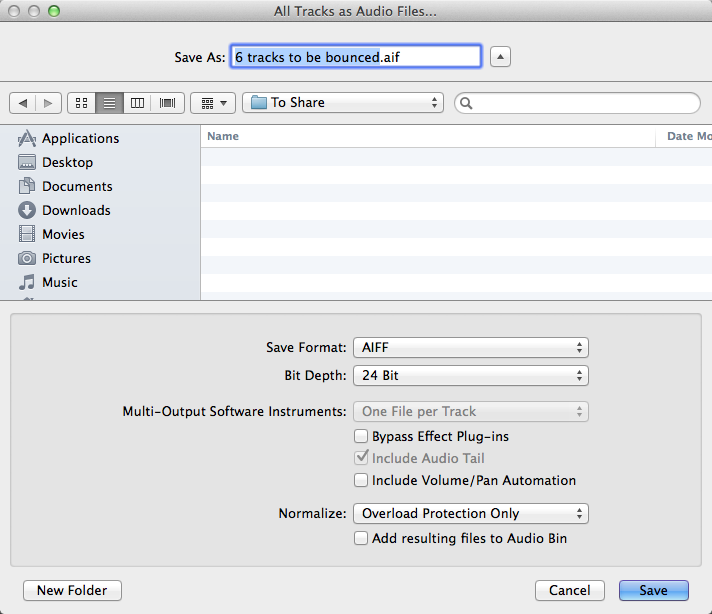
  1. Choose File→Export→All Tracks as Audio Files or press Shift-Command-E.
    A dialog opens, as shown in the figure.
    image0.png
  2. Choose the destination for the files.
    You should either create a folder or select an already created folder for your audio files. Otherwise, they’ll be exported as individual audio files to the currently selected folder.
  3. Select the audio file properties.
    Ask the person with whom you’re sharing your project what audio file properties he or she want. As a general rule, you should select the highest quality settings.
  4. Click Save.
    All tracks are exported as audio files.


Copyright © 2024 Recording Studios & Online Mixing  and Mastering Services I Mixed By Toch Inc. - All Rights Reserved.


Powered by Mixed By Toch Inc.

Cookie Policy

This website uses cookies. By continuing to use this site, you accept our use of cookies.

DeclineAccept & Close